


By the teams at NerdPress and Deep Roots Hosting:
If your inbox has filled up with scary-sounding security warnings this month, which is somewhat ironically Cybersecurity Awareness month, (and also the appropriate month for scary-sounding stories…) you’re not imagining that there have been more alerts to keep track of than usual.
In Friday’s newsletter, Rick asked a fair question: How scared should we be about all these WordPress security issues?
Our answer?
Take them seriously (but you can also take a deep breath).
As the hosting and support teams behind TBEX’s own website, we spent a lot of this month — especially last week — working on the problems behind all these headlines, so Rick asked us to share our insight into what’s been going on and what you can do to prepare.
What happened
On Sunday night, October 18, Andrew Wilder (NerdPress CEO) was alerted to fake plugins appearing on sites, including his own. Attackers had broken into the company behind UpdraftPlus, a popular backup plugin, and stolen the keys that connect sites to its UpdraftCentral service. They used those keys to slip “backdoor” plugins onto WordPress sites.
Andrew texted Peter Green at Deep Roots Hosting, who removed UpdraftPlus from every Deep Roots server that same night. NerdPress turned the plugin off across its client sites, added firewall rules to help protect against more attacks, and removed the old connection keys.
Two days later, news broke of two serious holes in PHP, the software that runs WordPress (and most of the web!). Deep Roots protected its servers overnight and rolled out the official patches as soon as they were ready while NerdPress kept clients informed and confirmed that extra firewall protections were in place.
Because our teams work together every day, there was no scramble to figure out who to call. We shared what we were seeing in real time and kept our mutual clients’ sites protected.
Where AI comes in
You’ve probably seen headlines saying AI is making hacking faster and cheaper. And it is.
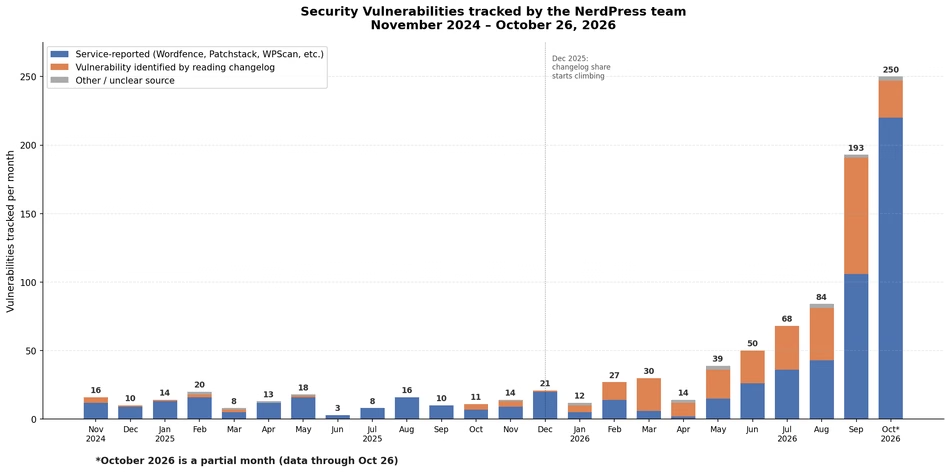
AI and automation make it cheap to try to exploit millions of sites at once, and Friday’s newsletter made a great point. Being “too boring to be a target” doesn’t protect you the way it used to. Small sites can get caught in the numbers game attackers are playing just as easily as “big fish.”
Ultimately, what we want you to know is that there’s nothing you as a site owner could have done to stop the UpdraftPlus breach or the PHP bug from happening. (The same goes for any future vendor breach or software flaw…)
What you can more easily control is how exposed your site is and how much damage an attack can do if your site is hit.
What you can do this week
- Verify which PHP version your site is on. In the WordPress dashboard, navigate to Tools → Site Health → Info → Server. Versions 8.2 through 8.5 are actively supported, so aiming for 8.4+ is best.
- Delete plugins and themes you aren’t using. Deactivating them isn’t enough.
- Disconnect services you’ve stopped using, like an old backup or site-management dashboard.
- Turn on two-factor login for WordPress, your hosting account, and your email. (The aptly named “Two Factor” plugin for WordPress is a good choice.)
- Make sure you have recent backups stored somewhere other than your site, and know how to restore them.
- Downgrade any administrator-level users who no longer need access.
- Keep plugins, themes, and WordPress itself up to date.
Questions to ask your host and support team
- When a major vulnerability hits, how will you tell me, and how fast do you patch?
- Who do I contact if my site goes down at 2 AM?
- Where are my backups kept, how far back do they go, and how long does a restore take?
- Do you work with my other providers (my host, developer, or support team) when something comes up?
The bottom line
Once everything was patched, Peter joked in Slack that “the real security was the friends we made along the way.” A big reason this week went smoothly is that our teams trust each other, and when your host and your support team work together, your site benefits.
If this month’s news left you feeling uneasy, that’s understandable. Pick one or two things from the list above and do them this week. And if you’d like a second set of eyes on your site, either of us is happy to help!
Deep Roots Hosting provides WordPress hosting and NerdPress provides WordPress support and maintenance. Both teams are proud to sponsor and support TBEX.




Add your first comment to this post